Fail

Fitness GPS Device Accuracy: Part I

If you have a GPS enabled fitness devices, then no doubt you've stood around after you run/ride with your buds and wondered why each one had slightly different results. Wonder no more - step into the two part series that goes in depth with a myriad of tests around GPS accuracy.

Fail

Sports GPS 2010 Recommendations

Can't decide which GPS device to get? No worries, there's lots of them - but your best bet will depend on exactly what you want from it. I dive into all my recommendations by sport and type of athlete, which should get ya pointed in the right direction.

Fail

Garmin Calorie Measurement

There are few topics that cause more confusion, intrigue and general ‘Huh?’ in the sports world than calorie burn. Many runners or cyclists often estimate calorie burn (and thus cookie allocation metrics) using borderline sketchy back of the napkin calculations. So, I set out to put together a bit of the definitive guide to calorie calculations on Garmin fitness devices.

Fail

Wahoo Giveaway!

As of today, you can’t get the Wahoo Fitness ANT+ Bike Case. Well, can’t legally get them without breaking into either my house or the Wahoo Fitness headquarters at an ‘undisclosed location’. Otherwise, they aren’t available till January. But I have two of them in my hands right now. One for test/review, and one two give away to you: My peeps.

Fail

Garmin FR210 Review

There was no doubt when the Forerunner 210 was announced that the goal was to offer a more feature rich version of it’s slightly older brother – the Forerunner 110. The Forerunner 210 touted new features such as foot pod support, additional data fields and intervals. But, would it be enough to warrant its price? And, what little hidden features would I find along the way?

One big ice cube - swimming in cold water 8

Rainmaker | 10:02 PM | , ,

Many of us 'retire' from open water swimming for the winter.  Some of us have the excuse that our dear little puddle of water is frozen over.  And then there are those of us that simply turn off the thought of open water swimming until both the air and water temperatures warm up.

A recent post by "The Science of Sport" discusses some of the science behind cold water swimming.  In addition, a recent document discussing cold water swimming from USMS - included swimming at the North Pole.

What the Science of Sport folks say is that basically as long as you keep moving - you'll be fine.  Now, do caveat that with the usual always swim with a buddy, etc... - but by and large if you keep moving and keep it to about 30 minutes you're in the safe zone.  Here's a little snippet from their site:

"Perhaps the first, and maybe the most surprising fact about cold water physiology, is that your body has too much heat to become hypothermic within about 30 minutes, no matter how cold the water is! In other words, it is not possible to get so cold that you're in danger unless you are in the water for more than about 30 minutes."

And here's the chart showing that.  The vertical axis is time in water (in hours) and the horizontal axis is water temperature.

clip_image002[5]

But now you say - wait, what about people who freeze to death in water in a matter of minutes?  Well... it turns out just 'being cold' is not really your biggest problemo.  What is actually your problem is one of two things - the shock your body gets with respect to breathing, where you breathing rate skyrockets temporarily - which in turn causes many people to actually drown from consumption of water.  The second, is simply a heart attack.

The below graph shows your breathing rate.  The horizontal axis is time in seconds, and the vertical is breaths/minute.

clip_image002

The real purpose of my post

So where am I going with all of this?  Probably not where you think.  No, I'm not recommending you go out in your partially frozen lake and go for a dip.

I'm actually about to share a little secret for triathlon's that some first timers may not realize (well, they will after their first time).  You know how before the swim leg you see all of those folks out there in the cold water doing short laps and warm up?  That's not all about warming your muscles up and looking special.  It's about getting your breathing calmed down. 

Why does it it matter?  Take a look at the above graph.  This is just if you drop someone into the water - no active swimming or battling that occurs during the first 1-2 minutes of a tri.  Note that it takes 40-50 seconds to 'compose yourself' with respect to breathing in the above graph.  In effect you're breathing will be MORE THAN DOUBLE what it needs to be before you add the tri madness.

Try it sometime.  Go into an open water swim (race or training) and swim for about 30-60 seconds first.  Then stop, let your body calm down.   And now go out and swim for 'real'.  Feels a lot better, doesn't it?

If I had one recommendation for first time open water swimmers - it would be to take advantage of those few minutes to get accustomed to the water and let your breathing calm down - even if it means just sitting in the water.  That way you're not out of breath and drowning 90 seconds into your tri. 

And remember the rule of open water swims - if you EVER get in trouble, simply roll over on your back and just float until your calmed down.  You'll feel fine within 10-15 seconds and be ready to continue on.

As an aside, a surprising number of folks have e-mailed me about open water swimming in the DC area over the past few months.  I did make one post a while back about it - but I'll revisit it with a comprehensive guide in late March once the weather warms up a bit.  As always, feel free to e-mail me with any questions - I'm more than happy to help.

One big ice cube - swimming in cold water 0

Rainmaker | 10:02 PM | ,

Many of us 'retire' from open water swimming for the winter.  Some of us have the excuse that our dear little puddle of water is frozen over.  And then there are those of us that simply turn off the thought of open water swimming until both the air and water temperatures warm up.

A recent post by "The Science of Sport" discusses some of the science behind cold water swimming.  In addition, a recent document discussing cold water swimming from USMS - included swimming at the North Pole.

What the Science of Sport folks say is that basically as long as you keep moving - you'll be fine.  Now, do caveat that with the usual always swim with a buddy, etc... - but by and large if you keep moving and keep it to about 30 minutes you're in the safe zone.  Here's a little snippet from their site:

"Perhaps the first, and maybe the most surprising fact about cold water physiology, is that your body has too much heat to become hypothermic within about 30 minutes, no matter how cold the water is! In other words, it is not possible to get so cold that you're in danger unless you are in the water for more than about 30 minutes."

And here's the chart showing that.  The vertical axis is time in water (in hours) and the horizontal axis is water temperature.

clip_image002[5]

But now you say - wait, what about people who freeze to death in water in a matter of minutes?  Well... it turns out just 'being cold' is not really your biggest problemo.  What is actually your problem is one of two things - the shock your body gets with respect to breathing, where you breathing rate skyrockets temporarily - which in turn causes many people to actually drown from consumption of water.  The second, is simply a heart attack.

The below graph shows your breathing rate.  The horizontal axis is time in seconds, and the vertical is breaths/minute.

clip_image002

The real purpose of my post

So where am I going with all of this?  Probably not where you think.  No, I'm not recommending you go out in your partially frozen lake and go for a dip.

I'm actually about to share a little secret for triathlon's that some first timers may not realize (well, they will after their first time).  You know how before the swim leg you see all of those folks out there in the cold water doing short laps and warm up?  That's not all about warming your muscles up and looking special.  It's about getting your breathing calmed down. 

Why does it it matter?  Take a look at the above graph.  This is just if you drop someone into the water - no active swimming or battling that occurs during the first 1-2 minutes of a tri.  Note that it takes 40-50 seconds to 'compose yourself' with respect to breathing in the above graph.  In effect you're breathing will be MORE THAN DOUBLE what it needs to be before you add the tri madness.

Try it sometime.  Go into an open water swim (race or training) and swim for about 30-60 seconds first.  Then stop, let your body calm down.   And now go out and swim for 'real'.  Feels a lot better, doesn't it?

If I had one recommendation for first time open water swimmers - it would be to take advantage of those few minutes to get accustomed to the water and let your breathing calm down - even if it means just sitting in the water.  That way you're not out of breath and drowning 90 seconds into your tri. 

And remember the rule of open water swims - if you EVER get in trouble, simply roll over on your back and just float until your calmed down.  You'll feel fine within 10-15 seconds and be ready to continue on.

As an aside, a surprising number of folks have e-mailed me about open water swimming in the DC area over the past few months.  I did make one post a while back about it - but I'll revisit it with a comprehensive guide in late March once the weather warms up a bit.  As always, feel free to e-mail me with any questions - I'm more than happy to help.

Lucky Number Slevin 6

Rainmaker | 4:52 AM |

So I was tagged by Ironmatron back last week to share seven random things about myself.  Here's my seven pieces of random information that you likely didn't know.

  1. I ran x-country my freshman year of high school.  And then didn't run again until about 2 years ago (which for those keeping track is about 10 years).
  2. I never went to college.
  3. I had planned to become a commercial airline pilot and was accepted to a few aviation related universities...but the computer consulting thing worked out a wee bit better in the end. I have flown an airplane myself a number of times, but haven't yet completed my pilots license.  I will eventually.
  4. I kinda sorta speak some Japanese.  Key in on the kinda-sorta part.
  5. In 2002 my travel for work peaked, I flew 265,770 miles (plus a few thousand miles I don't have records of on tiny/3rd world airlines).
  6. I have a 'small' wine collection of 149 bottles.  I don't drink that much though (wine or otherwise).
  7. I suck as Netflix.  Really bad.  I've had two movies rented for over 6 months at one point last year.   My current set of three movies is no less then 10 weeks old.

Here were the rules are as follows (I'm required to post them):

# Link to the person who tagged you
# Post the rules on your blog.
# Share seven random and/or weird facts about yourself on your blog.
# Tag seven random people at the end of your post, and include links to their blogs.
# Leave a comment on their blogs so that they know they have been tagged.

In return for my little blessing, I've tagged (required to) the following suckers people to receive their own little present. As to how I choose my seven victims...it was rather simple.  The last seven people to post a comment on my blog.  Sorry.  Really, I am sorry.  In a not-so-sorry kinda way.

Nat
Laurie
Donald
Xena
Who is SLB+
Peter
Monica

Just remember - don't hate the playa, hate the game.  Although...if you had to hate a specific playa...Ironmatron started this thing.  Just sayin'...

Lucky Number Slevin 0

Rainmaker | 4:52 AM |

So I was tagged by Ironmatron back last week to share seven random things about myself.  Here's my seven pieces of random information that you likely didn't know.

  1. I ran x-country my freshman year of high school.  And then didn't run again until about 2 years ago (which for those keeping track is about 10 years).
  2. I never went to college.
  3. I had planned to become a commercial airline pilot and was accepted to a few aviation related universities...but the computer consulting thing worked out a wee bit better in the end. I have flown an airplane myself a number of times, but haven't yet completed my pilots license.  I will eventually.
  4. I kinda sorta speak some Japanese.  Key in on the kinda-sorta part.
  5. In 2002 my travel for work peaked, I flew 265,770 miles (plus a few thousand miles I don't have records of on tiny/3rd world airlines).
  6. I have a 'small' wine collection of 149 bottles.  I don't drink that much though (wine or otherwise).
  7. I suck as Netflix.  Really bad.  I've had two movies rented for over 6 months at one point last year.   My current set of three movies is no less then 10 weeks old.

Here were the rules are as follows (I'm required to post them):

# Link to the person who tagged you
# Post the rules on your blog.
# Share seven random and/or weird facts about yourself on your blog.
# Tag seven random people at the end of your post, and include links to their blogs.
# Leave a comment on their blogs so that they know they have been tagged.

In return for my little blessing, I've tagged (required to) the following suckers people to receive their own little present. As to how I choose my seven victims...it was rather simple.  The last seven people to post a comment on my blog.  Sorry.  Really, I am sorry.  In a not-so-sorry kinda way.

Nat
Laurie
Donald
Xena
Who is SLB+
Peter
Monica

Just remember - don't hate the playa, hate the game.  Although...if you had to hate a specific playa...Ironmatron started this thing.  Just sayin'...

Quite simply: Dinner 5

Rainmaker | 6:25 PM |

So after only one workout today - 3,000 yards (split in two due to a minor incident at the pool, I ended up lounging on the pool deck for an hour) - I had more energy than I knew what to do with.

I remembered yesterday's post by Monica related to food, and decided it was time to cook something.  So this post is for you Monica - even though you can't enjoy it.  Not exactly my problemo that you're 3,000 miles away. ;)

A not-so-quick trip to the grocery store (I basically wandered around aimlessly for about 45 minutes picking up things and deciding what to cook), I was back at home ready to cook.

I decided on Corned Beef for the main course...but with a twist.  And because I couldn't decide while at the store what would go well with that as a appetizer - I just went with a mozzarella caprese, also with a twist.

First up was the appetizer.  I'm a big fan of all things mozzarella, so I decided to take it vertical.  First I laid down a swirled base of reduced balsamic vinegar.  Then I diced up some tomatoes, picked some fresh basil off the little plant, and then carved out a piece of mozzarella.  Finally I drizzled some extra virgin olive oil over it, and a touch of salt and pepper to bring out the flavors.  Oh, I used a circular mold to put it all together.

IMG_5837

Then it was time for the main course.  Traditionally Corned Beef is served with carrots, potatoes, cabbage and onions.  I wasn't feeling traditional.  So I made a bit of a modern twist on it.

Sure - I had potatoes, but I did them two different ways.  The first way was to julienne them super-thin into little strings.  Because you can't functionally julienne cabbage - I substituted it with cucumber.  Following which I also did carrot and beat (why beet?  Because it looks cool bright red).  With the leftover cucumber, beat and potato I made little chips - kinda like the Terra chips you see at the grocery store.

IMG_5841

After much cutting and nearly cutting my fingers off on the Benriner, it was time to deep fry the strands.  Quite simply you deep fry them for a short while, producing a small nest of crunchy vegetables.

Meanwhile, the the corned beef had been cooking away all content for the last three hours.  Also, I whipped up some mashed potatoes.  But since I was tweaking things a bit - I went with sweet potatoes.  They were soooo good (of course, the butter and heavy cream helped).  And here's what it all looks like assembled.

IMG_5852

(The vegetables on top, from left to right: Potato, Cucumber, Carrots, Beet.  Followed by meat below it and finally sweet potatoes on the bottom).

Following which... I was feeling lazy.  I had contemplated cooking up some chocolate cake.  But settled instead on Ben and Jerry's.

IMG_5854

Quite simply: Dinner 0

Rainmaker | 6:25 PM |

So after only one workout today - 3,000 yards (split in two due to a minor incident at the pool, I ended up lounging on the pool deck for an hour) - I had more energy than I knew what to do with.

I remembered yesterday's post by Monica related to food, and decided it was time to cook something.  So this post is for you Monica - even though you can't enjoy it.  Not exactly my problemo that you're 3,000 miles away. ;)

A not-so-quick trip to the grocery store (I basically wandered around aimlessly for about 45 minutes picking up things and deciding what to cook), I was back at home ready to cook.

I decided on Corned Beef for the main course...but with a twist.  And because I couldn't decide while at the store what would go well with that as a appetizer - I just went with a mozzarella caprese, also with a twist.

First up was the appetizer.  I'm a big fan of all things mozzarella, so I decided to take it vertical.  First I laid down a swirled base of reduced balsamic vinegar.  Then I diced up some tomatoes, picked some fresh basil off the little plant, and then carved out a piece of mozzarella.  Finally I drizzled some extra virgin olive oil over it, and a touch of salt and pepper to bring out the flavors.  Oh, I used a circular mold to put it all together.

IMG_5837

Then it was time for the main course.  Traditionally Corned Beef is served with carrots, potatoes, cabbage and onions.  I wasn't feeling traditional.  So I made a bit of a modern twist on it.

Sure - I had potatoes, but I did them two different ways.  The first way was to julienne them super-thin into little strings.  Because you can't functionally julienne cabbage - I substituted it with cucumber.  Following which I also did carrot and beat (why beet?  Because it looks cool bright red).  With the leftover cucumber, beat and potato I made little chips - kinda like the Terra chips you see at the grocery store.

IMG_5841

After much cutting and nearly cutting my fingers off on the Benriner, it was time to deep fry the strands.  Quite simply you deep fry them for a short while, producing a small nest of crunchy vegetables.

Meanwhile, the the corned beef had been cooking away all content for the last three hours.  Also, I whipped up some mashed potatoes.  But since I was tweaking things a bit - I went with sweet potatoes.  They were soooo good (of course, the butter and heavy cream helped).  And here's what it all looks like assembled.

IMG_5852

(The vegetables on top, from left to right: Potato, Cucumber, Carrots, Beet.  Followed by meat below it and finally sweet potatoes on the bottom).

Following which... I was feeling lazy.  I had contemplated cooking up some chocolate cake.  But settled instead on Ben and Jerry's.

IMG_5854

Four Mile Run Master Plan (or: How to spend $350 million dollars) 4

Rainmaker | 12:05 PM |

If ya live in the DC area, then this post is aimed at you.  If not...well..ok.

Many of you are likely familiar with - and probably even occasionally use Four Mile Run.  It's that semi-functional trail that in theory connects the GW Parkway trail to the W&OD trail.  The semi-functional part comes into play because as you likely know, when it hits Glebe road (coming from the GW trail) it all goes down the crapper.  You have to do this weird detour onto side streets and tango with traffic.  You then have to pole vault yourself over I-395 using the overpass thingy.  Finally, you get to navigate downtown Shirlington and then hopefully find your way over to the W&OD. 

It rarely works well, and I've seen many a confused trail users on the corners of various intersections looking like they're about to start offering services in the worlds oldest profession.

However, the good news is that the cities responsible (Alexandria/Arlington) are trying to do something about it.  A few months back they released the Four Mile Run Master Plan - a 118 page document with enough pretty pictures to double as a children's story book. It covers the different components of the trail and how they plan to improve them and make it a world class trail system.

For example, here's the section I referred to above - with the revisions included that now allow you to stay along the river in a protected right of way, all the way to the W&OD.  The major road there is I-395, and the bridge about 20% from the right edge is where you currently have to detour up into local streets.

FourMileRun1

So, the bad news?  They went overkill.  Waaaay overkill.  In an effort to create a world class park system they've put together something that I have serious doubts will ever come to fruition due to cost.  How much you ask?  A staggering $356.5 Million Dollars.  Yes, raise your pinky to your lip and give the old Dr. Evil - meeellliooon dollars.

What do you get for your 1/3rd of a BILLION dollars?  A lot of green.  The Army Corps of Engineers in theory will finish their review later this fall, and then it goes to numerous other agencies to try and figure out what is feasible.

I'm all for spending money on green spaces - I love it!  But really...all I want is for that short little .75 mile section to have a 6' wide asphalt path on it.  Nothing more...nothing less.  Actually, one more request - can I have it in my lifetime?

See below for some nice renderings:

FourMileRun2

FourMile3

FourMIleRun4

FourMileRun5

Four Mile Run Master Plan (or: How to spend $350 million dollars) 0

Rainmaker | 12:05 PM |

If ya live in the DC area, then this post is aimed at you.  If not...well..ok.

Many of you are likely familiar with - and probably even occasionally use Four Mile Run.  It's that semi-functional trail that in theory connects the GW Parkway trail to the W&OD trail.  The semi-functional part comes into play because as you likely know, when it hits Glebe road (coming from the GW trail) it all goes down the crapper.  You have to do this weird detour onto side streets and tango with traffic.  You then have to pole vault yourself over I-395 using the overpass thingy.  Finally, you get to navigate downtown Shirlington and then hopefully find your way over to the W&OD. 

It rarely works well, and I've seen many a confused trail users on the corners of various intersections looking like they're about to start offering services in the worlds oldest profession.

However, the good news is that the cities responsible (Alexandria/Arlington) are trying to do something about it.  A few months back they released the Four Mile Run Master Plan - a 118 page document with enough pretty pictures to double as a children's story book. It covers the different components of the trail and how they plan to improve them and make it a world class trail system.

For example, here's the section I referred to above - with the revisions included that now allow you to stay along the river in a protected right of way, all the way to the W&OD.  The major road there is I-395, and the bridge about 20% from the right edge is where you currently have to detour up into local streets.

FourMileRun1

So, the bad news?  They went overkill.  Waaaay overkill.  In an effort to create a world class park system they've put together something that I have serious doubts will ever come to fruition due to cost.  How much you ask?  A staggering $356.5 Million Dollars.  Yes, raise your pinky to your lip and give the old Dr. Evil - meeellliooon dollars.

What do you get for your 1/3rd of a BILLION dollars?  A lot of green.  The Army Corps of Engineers in theory will finish their review later this fall, and then it goes to numerous other agencies to try and figure out what is feasible.

I'm all for spending money on green spaces - I love it!  But really...all I want is for that short little .75 mile section to have a 6' wide asphalt path on it.  Nothing more...nothing less.  Actually, one more request - can I have it in my lifetime?

See below for some nice renderings:

FourMileRun2

FourMile3

FourMIleRun4

FourMileRun5

The Greatest Store on Earth 9

Rainmaker | 5:46 PM | ,

No not Ikea.  Not your local LBS.  Not REI.  It's Costco.  Cause where else can you buy a massive gazebo, a pair of jeans and a full uncut beef tenderloin all in the same place?

My day was basically a 10K run and a 40 mile bike ride - interspersed with yet another failed DirectTV install.  Seriously - when I tell you to bring a ladder that can go up a four story townhouse - DO NOT bring a 18' ladder and then stand around looking confused as to how you're going to ascend the remaining 40'.  Not.to.smart.

Anyway, after that it was time to conquer about three weeks worth of grocery shopping and outstanding Costco items.

Of course the first issue with any Costco trip is battling it out in the parking lot.  Tonight was no exception - this place was more hard core than a triathlon swim start.  People cutting people off, darting out in front of larger moving objects and numerous near crashes.

Speaking of the swim, of note is that the swim goggles are now back in stock again.  Three pairs of Speedo goggles for $15.  Not bad. 

Goggles

Although I'm a bit stocked up still on goggles from my earlier Box O' Swim Stuff.  So I passed on them for now.

After that, I had to get my Propel stock pile restocked.  Somehow I ended up on empty yesterday morning.  But before I found it (they moved my cheese!), I stumbled into the real reason to go to Costco on a Saturday - samples.  And they were baking little pizza's - woohoo!

Pizza

After that, I grabbed a few pair of jeans and khaki's since I've managed to get bike grease on all but two pairs.  I could care less about getting super-special-designer jeans.  These are Levi's and they're cheap.  I'll likely ruin them within 45 days anyway.  I topped off the cart with a pineapple, since it was rockin' cheap ($2.99!).  Then it was off to the checkout stands.

Mycart

My checkout choices weren't good, so I settled on a line that had the least number of items in peoples carts. 

I miscalculated.  Badly.

Apparently when someone tries to buy 15 chickens things go awry.  The FDA or animal society is called in and the whole situation breaks down. 

Wait - you thought I was kidding about the 15 chickens?  Nope.  Seriously - 15 little chickens.  That's like a whole family farms worth of the little chickadees.  And because you might doubt me - I bring forward proof - a cart full of chickens:

Chicken

After my Costco antics it was a not-so-quick stop off at the grocery store for my remaining items, and then finally dinner.  Cheese Steaks from a nearby Philly Cheese Steak place.  No, it wasn't healthy.  But I ate semi-healthy all week.  And it was better than eating 15 chickens.

The Greatest Store on Earth 0

Rainmaker | 5:46 PM | ,

No not Ikea.  Not your local LBS.  Not REI.  It's Costco.  Cause where else can you buy a massive gazebo, a pair of jeans and a full uncut beef tenderloin all in the same place?

My day was basically a 10K run and a 40 mile bike ride - interspersed with yet another failed DirectTV install.  Seriously - when I tell you to bring a ladder that can go up a four story townhouse - DO NOT bring a 18' ladder and then stand around looking confused as to how you're going to ascend the remaining 40'.  Not.to.smart.

Anyway, after that it was time to conquer about three weeks worth of grocery shopping and outstanding Costco items.

Of course the first issue with any Costco trip is battling it out in the parking lot.  Tonight was no exception - this place was more hard core than a triathlon swim start.  People cutting people off, darting out in front of larger moving objects and numerous near crashes.

Speaking of the swim, of note is that the swim goggles are now back in stock again.  Three pairs of Speedo goggles for $15.  Not bad. 

Goggles

Although I'm a bit stocked up still on goggles from my earlier Box O' Swim Stuff.  So I passed on them for now.

After that, I had to get my Propel stock pile restocked.  Somehow I ended up on empty yesterday morning.  But before I found it (they moved my cheese!), I stumbled into the real reason to go to Costco on a Saturday - samples.  And they were baking little pizza's - woohoo!

Pizza

After that, I grabbed a few pair of jeans and khaki's since I've managed to get bike grease on all but two pairs.  I could care less about getting super-special-designer jeans.  These are Levi's and they're cheap.  I'll likely ruin them within 45 days anyway.  I topped off the cart with a pineapple, since it was rockin' cheap ($2.99!).  Then it was off to the checkout stands.

Mycart

My checkout choices weren't good, so I settled on a line that had the least number of items in peoples carts. 

I miscalculated.  Badly.

Apparently when someone tries to buy 15 chickens things go awry.  The FDA or animal society is called in and the whole situation breaks down. 

Wait - you thought I was kidding about the 15 chickens?  Nope.  Seriously - 15 little chickens.  That's like a whole family farms worth of the little chickadees.  And because you might doubt me - I bring forward proof - a cart full of chickens:

Chicken

After my Costco antics it was a not-so-quick stop off at the grocery store for my remaining items, and then finally dinner.  Cheese Steaks from a nearby Philly Cheese Steak place.  No, it wasn't healthy.  But I ate semi-healthy all week.  And it was better than eating 15 chickens.

How to ski with your Garmin Forerunner 305 GPS 14

Rainmaker | 3:37 PM | ,

Like most Garmin users, I've run with my Forerunner, as well as the normal mountain or road bike journeys.  But as frequent readers will know, I've also pushed mine a bit more.  I've taken it on lake and ocean swims, as well as multi-day kayak trips.  So it was natural to kick it up a notch and venture into the French Alps for some high altitude downhill skiing with my little red friend.

Over the course of a number of ski days I've been able to perfect the tricks to skiing with your Forerunner (or really any GPS for that matter).  Nothing I mention here voids your warrant in any way/shape/form.  By the same token - don't blame me if you crash and burn and somehow manage to break your watch.  But do keep in mind that the watch is actually very durable.  If you crash hard enough to break it - it's likely because you hit some other object (besides snow), in which case you've probably got other issues.  Really no different than crashing on a bike at that point.

With that...here's my guide to skiing with your GPS.  Pretty much everything I say here will also apply to snowboarders...assuming you actually get off the ground ;).

Getting into position:

As any user of GPS technology will tell you - the most important piece to the puzzle is positioning.  Location, location, location.  This holds even more true for skiing.  With skiing you'll be constantly turning and changing the position of the watch relative to the satellites.  Furthermore, you're rate of speed is probably higher than a run and thus a lack of coverage will quickly lead to bad data. 

The good news is you have a few options to work with.  Let's break them out: in order of preference

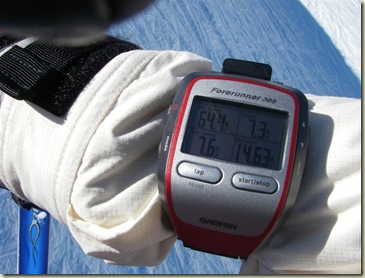
  1. The Wrist:  Ok, this may seem obvious - but there's a few things to keep in mind here.  First you want to ensure it's ABOVE your heavy ski coat.  Putting it below your coat will only reduce satellite coverage at times when you need it most.  Don't worry about the temperature - the Forerunner 305 is designed to operate in temps down to -4*F (or -20*C) - per page 66 on the operating manual.  And of course it's more than water resistant for our purposes.

    The advantage to the wrist is that you can easily see it while you are skiing - or at the base of a run/chair/etc... The disadvantage is that if your coat is uber-thick - the wrist strap may not fit all the way around.  I'm using the Velcro strap that comes with the quick release kit and it has much more flexibility with respect to adjustability.

    The downside to putting it on your wrist is that if it's not tight I could see a case where you might lose it if it fell off.  One way to solve this problem is just take a simple piece of string and tie off the wrist band to your coat/glove/straps.  Problem solved.
    IMGP2734 
  2. On your head: This is technically the best position for reception.  But the problemo is you can't see it without taking off your hat/helmet.  If you have a helmet, the best place is to use the goggle strap button/clip that's on the back of most helmets to also feed the watch through.  The problem here is you quite simply look like a dork.  Nuff' said.
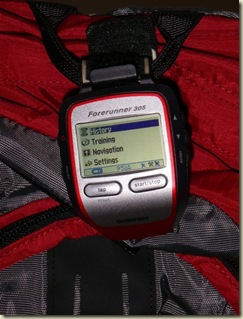
  3. On a backpack.  This actually isn't half bad and what I did for a few hours one day.  Most outdoorsy backpacks have plenty of places to securely clip in your GPS.  Just do it on the upper half so it has a semi-clear view of the sky.  The only downside to this place is you can't easily see it.  But if you just want to analyze it after the fact - it may be the best overall location with respect to security.
    IMGP2904

For the record, here's places that don't work:

  1. Hanging under your wrist using the glove strap.  Reception sucks - doesn't work.  Simple as that.
  2. In your coat pocket.  I tried upper chest, arm pocket, inside pocket.  None of them gave great reception in most cases.  Sure it kinda sorta works in some cases - but not all.
  3. Inside a backpack.  Unlike #3 above, inside the backpack is basically as bad as being inside your coat.  Bad reception means bad data.
  4. On your pole strap: This one isn't horrible, but it's not ideal.  The problem is that you're likely to either rip it off accidentally or otherwise lose it during the day.

Ok, got it all placed?  Give it a quick test run and make sure that you don't get the dreaded "No Signal" error message.  Once that's set, let's move onto using it on the hill.

Using it on the mountain:

Ok, before we go into details - let's get one thing straight.  Actively toying with a GPS device while at the same time skiing at a rate greater than 5MPH is a recipe for disaster.  Not so much for you - but for the people you manage to run into.   So let's keep the toying to a minimum...mmkay?

With that said - I use four data fields on mine.  I start with the 'Other' baseline, but then modify it with four fields that I want.  To add fields, go to:

  1. Settings > General > Data Fields
  2. (I selected biking, because it shows MPH instead of Pace), but "Other" also works
  3. Set it to four data fields, then enter
  4. Then select the data fields you want

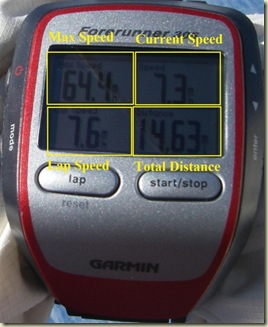
Here are the four fields I use:

  • Max Speed: This tells me the overall max speed for the day
  • Current speed: This is the 'in the moment' speed, keeping in mind that this usually lags behind about 5-7 seconds.
  • Lap Speed: This is the average speed for the lap.  A lap is whatever you want it to be.  I generally hit a laptop at the top/bottom of the chair to get a good understanding of my average speed
  • Distance: Quite simply - the total distance for the day.  You can instead do Lap Distance if you want the total run's distance.
    GarminSkiing

On the hill you pretty much have two options with respect to stopping or starting it.  Your first option is to leave the watch running the whole day (perhaps except lunch).  This means it captures your chairlift rides, lift lines and really anywhere you go.  The second option is to stop/start the timer at the start/end of every run.

I've tried both methods and really just leaving it running is the easiest.  Sport Tracks allows you to easily split out the data as you see fit, so it's just not worth the hassle of stopping/starting it all day long.

Finally...there is splits.  Creating a lap point/split is useful if you want to know exactly how long a given run is without the messiness of sorting through 8 hours of data.  One day I did splits all day long at the top/bottom of runs, and the next I only did it for a few select runs.  It doesn't affect anything other than just way points you can look at and check later.

Analyzing the Data:

Now you've completed a day's worth of skiing and it's time to see just how much descending you did.    For this, we'll use Sport Tracks 2.0.  Sure, you could use something else - but why use something sub par when you can use the best for free?

The first thing I did was to create a new Downhill Skiing profile. You don't have to do this, but this allows me to easily sort out the data from the rest of my sports.  To do so open Sport Tracks and then:

  1. (Other Tasks in the lower left) > Select View > Categories
  2. Click the 'Add Category' button at the top
  3. Give it a new category name, I use 'Downhill Skiing'
  4. Leave the subcategory as 'My Activities'
  5. Uncheck the options box, and change the 'Pace or Speed' option to 'Speed'.
  6. If you're a metric person, then change your unit of measure to what floats KM/meters.
  7. Now switch back to the main view (Select View > Daily Activity)

Go ahead and import your data as normal from your GPS device.  Except this time choose Downhill Skiing as the category type.  After I import, I use two free plug-ins to import the weather and auto-correct the elevation.  These are optional, but are kinda neat.

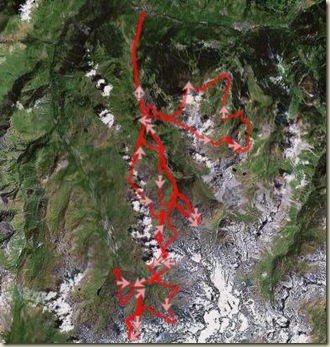
Once that's done - you'll have your data viewable on a map.  There's really a few different things that are interesting.  First up is the route view:
SkiRouteView

The problem with the above is that since most aerial photography/satellite imagery is bought from the summer seasons - you can't really tell where you skied. 

Next up is the elevation over time map.  This is accessible from the middle drop-down that normally says 'Summary', change it to 'Elevation'.  And you can see your little up and down graphs.  It will also show you your total 'Descending' for the day.  This is of course the number that all skiers boast about - how many vertical feet they skied that day.
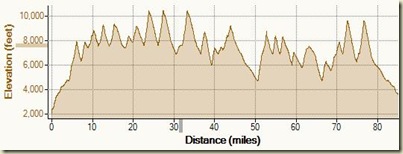
SkiElevationMap

What's also kinda cool is using Google Earth to ski your route overlayed onto a 3D view of it.  From Sports Tracks simply click "Export > Google Earth".  This assumes you've installed the free Google Earth application.
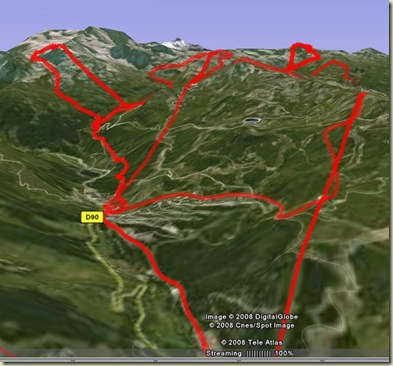
GoogleEarthSkiRoute

You can easily see the lengths of each run by looking at splits (if you did splits above):
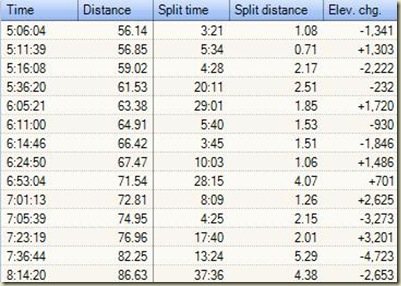
SkiSplits

So there ya go...some tips on how to use the Garmin Forerunner 305 while skiing.  If you've got any suggestions, feel free to pass them along.

How to ski with your Garmin Forerunner 305 GPS 0

Rainmaker | 3:37 PM | ,

Like most Garmin users, I've run with my Forerunner, as well as the normal mountain or road bike journeys.  But as frequent readers will know, I've also pushed mine a bit more.  I've taken it on lake and ocean swims, as well as multi-day kayak trips.  So it was natural to kick it up a notch and venture into the French Alps for some high altitude downhill skiing with my little red friend.

Over the course of a number of ski days I've been able to perfect the tricks to skiing with your Forerunner (or really any GPS for that matter).  Nothing I mention here voids your warrant in any way/shape/form.  By the same token - don't blame me if you crash and burn and somehow manage to break your watch.  But do keep in mind that the watch is actually very durable.  If you crash hard enough to break it - it's likely because you hit some other object (besides snow), in which case you've probably got other issues.  Really no different than crashing on a bike at that point.

With that...here's my guide to skiing with your GPS.  Pretty much everything I say here will also apply to snowboarders...assuming you actually get off the ground ;).

Getting into position:

As any user of GPS technology will tell you - the most important piece to the puzzle is positioning.  Location, location, location.  This holds even more true for skiing.  With skiing you'll be constantly turning and changing the position of the watch relative to the satellites.  Furthermore, you're rate of speed is probably higher than a run and thus a lack of coverage will quickly lead to bad data. 

The good news is you have a few options to work with.  Let's break them out: in order of preference

  1. The Wrist:  Ok, this may seem obvious - but there's a few things to keep in mind here.  First you want to ensure it's ABOVE your heavy ski coat.  Putting it below your coat will only reduce satellite coverage at times when you need it most.  Don't worry about the temperature - the Forerunner 305 is designed to operate in temps down to -4*F (or -20*C) - per page 66 on the operating manual.  And of course it's more than water resistant for our purposes.

    The advantage to the wrist is that you can easily see it while you are skiing - or at the base of a run/chair/etc... The disadvantage is that if your coat is uber-thick - the wrist strap may not fit all the way around.  I'm using the Velcro strap that comes with the quick release kit and it has much more flexibility with respect to adjustability.

    The downside to putting it on your wrist is that if it's not tight I could see a case where you might lose it if it fell off.  One way to solve this problem is just take a simple piece of string and tie off the wrist band to your coat/glove/straps.  Problem solved.

    IMGP2734 
  2. On your head: This is technically the best position for reception.  But the problemo is you can't see it without taking off your hat/helmet.  If you have a helmet, the best place is to use the goggle strap button/clip that's on the back of most helmets to also feed the watch through.  The problem here is you quite simply look like a dork.  Nuff' said.
  3. On a backpack.  This actually isn't half bad and what I did for a few hours one day.  Most outdoorsy backpacks have plenty of places to securely clip in your GPS.  Just do it on the upper half so it has a semi-clear view of the sky.  The only downside to this place is you can't easily see it.  But if you just want to analyze it after the fact - it may be the best overall location with respect to security.

    IMGP2904

For the record, here's places that don't work:

  1. Hanging under your wrist using the glove strap.  Reception sucks - doesn't work.  Simple as that.
  2. In your coat pocket.  I tried upper chest, arm pocket, inside pocket.  None of them gave great reception in most cases.  Sure it kinda sorta works in some cases - but not all.
  3. Inside a backpack.  Unlike #3 above, inside the backpack is basically as bad as being inside your coat.  Bad reception means bad data.
  4. On your pole strap: This one isn't horrible, but it's not ideal.  The problem is that you're likely to either rip it off accidentally or otherwise lose it during the day.

Ok, got it all placed?  Give it a quick test run and make sure that you don't get the dreaded "No Signal" error message.  Once that's set, let's move onto using it on the hill.

Using it on the mountain:

Ok, before we go into details - let's get one thing straight.  Actively toying with a GPS device while at the same time skiing at a rate greater than 5MPH is a recipe for disaster.  Not so much for you - but for the people you manage to run into.   So let's keep the toying to a minimum...mmkay?

With that said - I use four data fields on mine.  I start with the 'Other' baseline, but then modify it with four fields that I want.  To add fields, go to:

  1. Settings > General > Data Fields
  2. (I selected biking, because it shows MPH instead of Pace), but "Other" also works
  3. Set it to four data fields, then enter
  4. Then select the data fields you want

Here are the four fields I use:

  • Max Speed: This tells me the overall max speed for the day
  • Current speed: This is the 'in the moment' speed, keeping in mind that this usually lags behind about 5-7 seconds.
  • Lap Speed: This is the average speed for the lap.  A lap is whatever you want it to be.  I generally hit a laptop at the top/bottom of the chair to get a good understanding of my average speed
  • Distance: Quite simply - the total distance for the day.  You can instead do Lap Distance if you want the total run's distance.

    GarminSkiing

On the hill you pretty much have two options with respect to stopping or starting it.  Your first option is to leave the watch running the whole day (perhaps except lunch).  This means it captures your chairlift rides, lift lines and really anywhere you go.  The second option is to stop/start the timer at the start/end of every run.

I've tried both methods and really just leaving it running is the easiest.  Sport Tracks allows you to easily split out the data as you see fit, so it's just not worth the hassle of stopping/starting it all day long.

Finally...there is splits.  Creating a lap point/split is useful if you want to know exactly how long a given run is without the messiness of sorting through 8 hours of data.  One day I did splits all day long at the top/bottom of runs, and the next I only did it for a few select runs.  It doesn't affect anything other than just way points you can look at and check later.

Analyzing the Data:

Now you've completed a day's worth of skiing and it's time to see just how much descending you did.    For this, we'll use Sport Tracks 2.0.  Sure, you could use something else - but why use something sub par when you can use the best for free?

The first thing I did was to create a new Downhill Skiing profile. You don't have to do this, but this allows me to easily sort out the data from the rest of my sports.  To do so open Sport Tracks and then:

  1. (Other Tasks in the lower left) > Select View > Categories
  2. Click the 'Add Category' button at the top
  3. Give it a new category name, I use 'Downhill Skiing'
  4. Leave the subcategory as 'My Activities'
  5. Uncheck the options box, and change the 'Pace or Speed' option to 'Speed'.
  6. If you're a metric person, then change your unit of measure to what floats KM/meters.
  7. Now switch back to the main view (Select View > Daily Activity)

Go ahead and import your data as normal from your GPS device.  Except this time choose Downhill Skiing as the category type.  After I import, I use two free plug-ins to import the weather and auto-correct the elevation.  These are optional, but are kinda neat.

Once that's done - you'll have your data viewable on a map.  There's really a few different things that are interesting.  First up is the route view:

SkiRouteView

The problem with the above is that since most aerial photography/satellite imagery is bought from the summer seasons - you can't really tell where you skied. 

Next up is the elevation over time map.  This is accessible from the middle drop-down that normally says 'Summary', change it to 'Elevation'.  And you can see your little up and down graphs.  It will also show you your total 'Descending' for the day.  This is of course the number that all skiers boast about - how many vertical feet they skied that day.

SkiElevationMap

What's also kinda cool is using Google Earth to ski your route overlayed onto a 3D view of it.  From Sports Tracks simply click "Export > Google Earth".  This assumes you've installed the free Google Earth application.

GoogleEarthSkiRoute

You can easily see the lengths of each run by looking at splits (if you did splits above):

SkiSplits

So there ya go...some tips on how to use the Garmin Forerunner 305 while skiing.  If you've got any suggestions, feel free to pass them along.

Woohoo - snow! 4

Rainmaker | 5:33 PM |

I haven't had much snow this year here in DC.  Very disappointing.  Really only once while I was actually in town, and it simply made a mess of the roads and hosed up a long bike ride.

So when it started coming down earlier this afternoon, I was pretty excited to get out and run in it.  There's something fun about running in the snow - something different.  And really in the scope of a year's worth of running, keeping things different is key.

PIC-0158

What was cool about my run was that the path was relatively clear of the slippery stuff, making it easy to keep pace while still enjoying the scenery.  Although the big flakes would get into my eyes, which made things more difficult.

PIC-0156

After that it was off to the pool for 2250 yards of fun.  Although the water felt nice and warm compared to the cold run.

I met with my new tri coach last night for the first time, and will have more deets about that over the next week or two.  Good things there though.

Also, at some point I'll bust out my '7 random things' post that Ironmatron tagged me over the weekend.  I've already written up the 7 random things, just gotta decide on my 7 random victims that get tagged next.

Woohoo - snow! 0

Rainmaker | 5:33 PM |

I haven't had much snow this year here in DC.  Very disappointing.  Really only once while I was actually in town, and it simply made a mess of the roads and hosed up a long bike ride.

So when it started coming down earlier this afternoon, I was pretty excited to get out and run in it.  There's something fun about running in the snow - something different.  And really in the scope of a year's worth of running, keeping things different is key.

PIC-0158

What was cool about my run was that the path was relatively clear of the slippery stuff, making it easy to keep pace while still enjoying the scenery.  Although the big flakes would get into my eyes, which made things more difficult.

PIC-0156

After that it was off to the pool for 2250 yards of fun.  Although the water felt nice and warm compared to the cold run.

I met with my new tri coach last night for the first time, and will have more deets about that over the next week or two.  Good things there though.

Also, at some point I'll bust out my '7 random things' post that Ironmatron tagged me over the weekend.  I've already written up the 7 random things, just gotta decide on my 7 random victims that get tagged next.

Jumping Houses 8

Rainmaker | 2:59 PM | , ,

We spent the morning of our second and final day skiing in France on the Courchevel side of the Three Valley's Resort. As I mentioned yesterday, the ski area is really a collection of a number of resorts all seamlessly linked together. This mountain is a little bit more tame than some of the others (there are of course some exceptions) - so most of the time was spent just tooling around and having fun. Moguls, cruisers, and runs spattered with civilians. Here's one of those French civilians on a platter lift. Where did he find those stylish shades?

IMGP2832

Courchevel itself boasts some interesting features not found elsewhere though. For example, there's an airport at the base of the lift area. Planes fly into this 'one shot' airport near constantly. Courchevel is a playground for European's rich - and flying in on a private plane or helicopter is certainly the way to go. I checked in on some prices before I left - and it's over $2,000 per person for a shuttle from Geneva. I'll take my $30 per day rental car.

Planes land uphill and take off downhill. I'm standing at the end of the very short runway.

IMG_5642

After some wandering around it was time for lunch. Our favorite place for lunch is Restaurant Le Panoramic - which is located at the top of the main tram at Courchevel. Here's the view of it from a few thousand feet away, you can see the tram lines leading up to it.

IMG_5753

And then here's the view once you're up there:

IMG_5786

And after you're done chowing down, it's time to relax and take in more of the view:

IMG_5792

One other interesting sports they do up here is paragliding. They basically ski off the side of the mountain and catch the winds/thermals above the villages and then ski back down to the mountain. Kinda interesting.

IMG_5689A

Following lunch, we dropped down the other side of the peak to Meribel. We probably enjoy Meribel and Val Thoren the most out of the numerous resorts up in the Valley's. They both offer challenging terrain and long runs. One run being 7 miles long with 5,000 vertical feet of drop.

On our journey down into the Meribel base we made some high speed runs on an empty slope. We couldn't quite get up to full speed today. Many things play into getting up to speed - including civilians around, slope grade and snow temperature. Nonetheless, we had some fun. Here's a short video my brother shot of me as I came around a corner and then accelerated down an empty run. On this one I peaked around 60MPH shortly after passing him. I was wearing a helmet cam, but that video just sucks (too jittery).

After this, we headed up to one of the peaks for some good mogul runs. After completing one, we noted a small house just off a main run. My brother and I are two different types of skiers. He tends to like cliffs and jump acrobatics, I tend to like pure speed. Ironically, he doesn't like heights...and I do. Once we saw the house and inspected it - it was clear what had to be done: It had to be jumped. So I setup and caught a pretty cool series of photos (about 8 in 2 seconds). Here's the best shot of the bunch.

IMG_5805A

Following house-jumping it was time to head back to Geneva and catch our flight to Frankfurt. One of the first road signs you see upon departing Courchevel is the below. We considered stopping...

IMG_5825

We got into Frankfurt and after a 15 minute trip to the hotel - fell asleep near instantly. This morning I got up early and went for a run along the banks of the Main River in Frankfurt. It was a nice four mile run - aside from my hands nearly freezing off. One thing I found interesting is the lack of other runners on the bike/running path. Only one person out there in my four miles. It wasn't super-cold out, I just forgot to put on gloves. Odd. Anyway's, here's a quick photo I snapped over the river on one of the bridges at my turnaround point.

Pano1

And with that... it's back to the usual.

[Minor Update: I just pulled the weather information for my run via Sport Tracks...no wonder I thought it was cold. It was 20* out at that time. And I was just wearing shorts and a super-thin shirt. And no gloves. Eek]


DC Rainmaker Test Copyright © 2010 Prozine Theme is Designed by Lasantha. Home | RSS Feed | Comment RSS